How PHP Sessions Actually Work — From Browser Request to Final Response
Section 1 — Introduction: How PHP Sessions Really Work Behind the Scenes
Before we understand how PHP sessions work, we need to understand something more fundamental:
How a browser and a server actually talk to each other over the internet.
Let’s take a very simple analogy.
The Restaurant Analogy
Imagine you are sitting in a restaurant.
- You are the client (the browser).
- The kitchen is the server (where the website lives).
You want food, just like your browser wants a webpage.
But there is a problem.
You cannot walk directly into the kitchen and shout your order. There needs to be a communication bridge between you and the kitchen.
That bridge is the waiter.
In the world of the internet, this waiter is called HTTP (HyperText Transfer Protocol).
HTTP is simply a set of rules that computers follow to send messages to each other.
Without this waiter:
- The browser cannot tell the server what it wants.
- The server does not know where to send the response.
The Request–Response Cycle
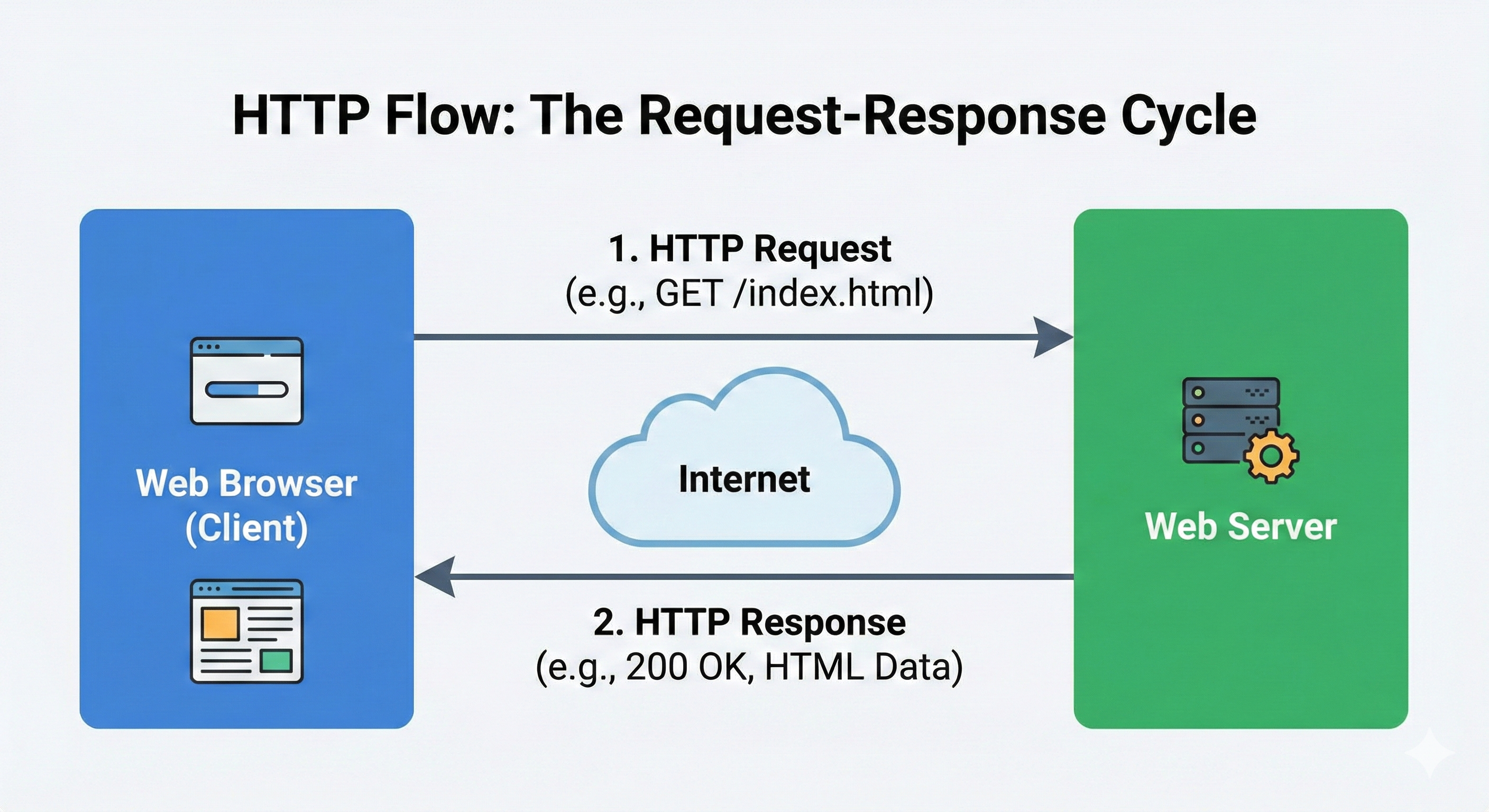
Every interaction between a browser and a server follows the same two steps:
-
Request — The browser says:
Please give me this page: /search?q=google.com -
Response — The server replies:
Here is the page you asked for.
And this happens every single time you click a link, refresh a page, or submit a form.
A Note on HTTPS
You will often see HTTPS instead of HTTP.
This is the same waiter, but now he carries your messages in a locked briefcase so that no one else can read or tamper with them while they travel across the internet.
The Most Important Truth: HTTP Is Stateless
Now we come to the most important concept.
HTTP is stateless.
This means the server does not remember you between two different requests.
Every request is treated as a completely new interaction, with no memory of what happened even a second ago.
The “Amnesia” Analogy
Imagine you are talking to a person with severe short‑term memory loss.
-
Interaction 1
You: “Hi, my name is Sam.”
They: “Hello Sam!” -
Interaction 2
You: “What is my name?”
They: “I don’t know. Who are you?”
That person is stateless.
They processed your first sentence, responded, and immediately forgot everything.
This is exactly how a web server behaves.
Why This Is a Problem
Because the server forgets you instantly, it cannot naturally handle things like:
- Keeping you logged in
- Remembering items in your shopping cart
- Tracking which pages you visited
- Knowing who you are across multiple pages
But we know websites clearly do all of this.
So how?
The Solution
To solve this problem, web developers use Cookies and Sessions.
These act like a nametag on your shirt.
Even though the server has “amnesia,” it can look at your nametag and say:
“Oh, you are Sam. You are logged in. I remember you.”
In the next sections, we will follow a single user request step‑by‑step and see how PHP sessions use this nametag system to make a stateless protocol feel stateful.
What Is This “Nametag”? — Cookies and Sessions
Cookies (Stored in the Browser)
A cookie is a small piece of data that the server asks the browser to store.
On the first response, the server sends something like:
Set-Cookie: PHPSESSID=abc123
The browser saves this value.
On every next request, the browser automatically sends it back:
Cookie: PHPSESSID=abc123
Cookie’s job: carry a small piece of identification data between the browser and the server.
Sessions (Stored on the Server)
A session is where the actual user data is stored, and this data lives on the server.
When PHP creates a session, it stores information in a session file like:
sess_abc123
Inside this file can be data like:
- user_id
- login status
- cart items
- user preferences
But how does PHP know which session file belongs to which user?
Because the browser keeps sending back the cookie:
PHPSESSID=abc123
This ID tells PHP exactly which session file to open.
Cookie carries the session ID. Session stores the actual data.
Section 2 — What Happens When a Page With session_start() Is Accessed
Assume a user opens:
http://example.com/dashboard.php
And at the top of this file:
session_start();
This single line is where the entire session mechanism begins.
Step 1 — Browser Sends an HTTP Request
The request contains:
- URL
- Headers
- Cookies (if previously stored)
If the user visited before:
Cookie: PHPSESSID=abc123
If first time: no cookie present.
This difference is crucial because session_start() behaves differently.
Case A — Cookie Is Present
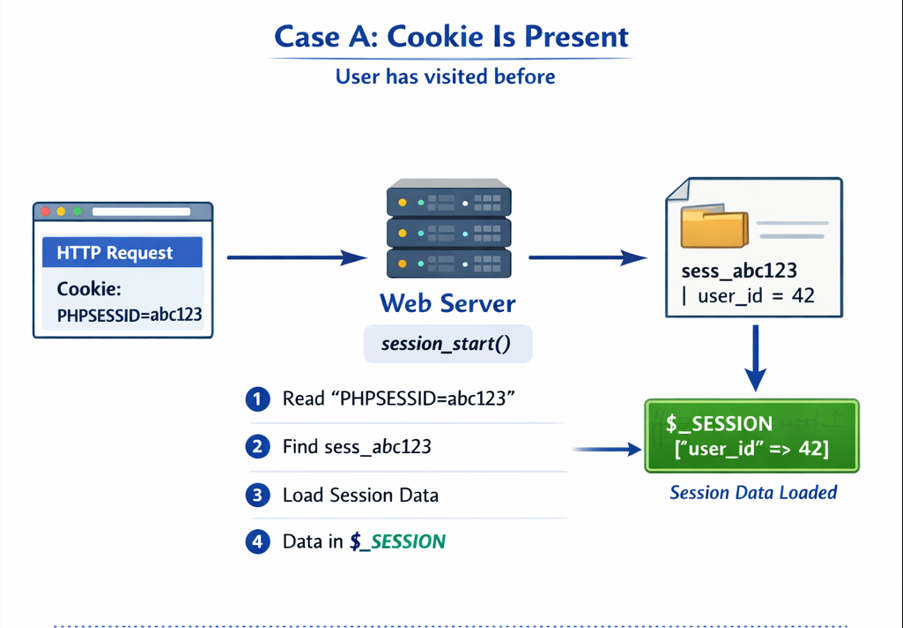
Browser says: “I have visited before. Here is my session ID.”
When session_start() runs:
- PHP reads
PHPSESSID=abc123 - PHP goes to session storage (usually
/tmp) - Searches for:
sess_abc123 - If file exists, PHP reads it
- Data is loaded into
$_SESSION
Now you can do:
echo $_SESSION['user_id'];
Even though the data lives in a server file.
PHP did not remember — it reloaded the session file into memory.
Case B — No Cookie Present (First Visit)
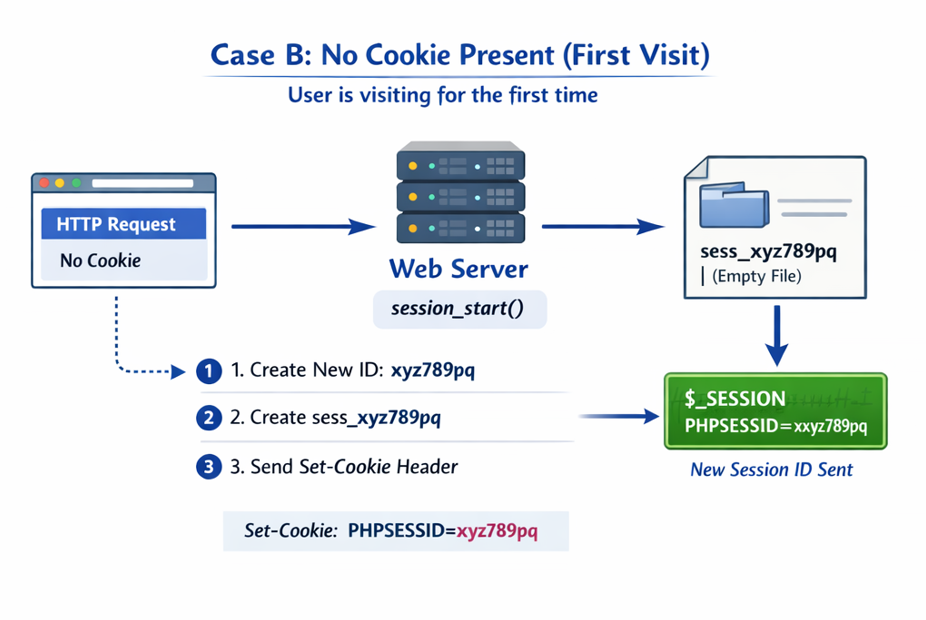
Browser says: “I have never been here before.”
session_start() will:
- Generate a new session ID:
xyz789pq - Create file:
sess_xyz789pq - Send header back:
Set-Cookie: PHPSESSID=xyz789pq
The browser saves it.
From the next request onward, this cookie is sent automatically.
What Just Happened Behind the Scenes
| Situation | What PHP Does |
|---|---|
| Cookie exists | Finds session file and loads data into $_SESSION |
| Cookie missing | Creates session ID, file, and sends cookie to the browser |
This happens on every request where session_start() is used.